고정 헤더 영역
상세 컨텐츠
본문
728x90
stless 새로운 statelessWidget를 생성하는 명령어 아래와 같이 자동 입력된다.
class  extends StatelessWidget {
  const ({super.key});

  @override
  Widget build(BuildContext context) {
    return const Placeholder();
  }
}
폴더 및 파일을 생성하여 코드를 깔끔하게 정리할 수 있다.
screen 폴더 생성 후 home_screen.dart 파일을 생성
import 'package:flutter/material.dart';

class HomeScreen extends StatelessWidget {
  const HomeScreen({super.key});

  @override
  Widget build(BuildContext context) {
    return Scaffold(
      body: Center(
        child: Text('Home Screen'),
      ),
    );
  }
}
main.dart
import 'package:flutter/material.dart';
import 'package:row_and_column/screen/home_screen.dart';

void main() {
  runApp(MaterialApp(
    home: HomeScreen(),
  ));
}
column MainAxisAlignment - 주축 정렬
- start - 시작(맨위)
- end - 끝(맨 아래)
- center - 가운데
- spaceBetween - 위젯과 위젯의 사이가 동일하게 배치
- spaceEvenly - 같은 간격으로 배치하지만 끝과끝에도 동일한 여백
- spaceAround - 같은 간격으로 배치하지만 끝과끝에 반의 여백
row 가로 배치 MainAxisAlignment - 주축 정렬
- start - 시작(왼쪽)
- end - 끝(오른쪽)
- center - 가운데
- spaceBetween - 위젯과 위젯의 사이가 동일하게 배치(위젯이 양끝에서 시작)
- spaceEvenly - 같은 간격으로 배치하지만 끝과끝에도 동일한 여백
- spaceAround - 같은 간격으로 배치하지만 끝과끝에 반의 여백
column CrossAxisAlignment 세로의 반대축 정렬
- start- 시작(왼쪽)
- end - 끝(오른쪽)
- center - 가운데 (기본값)
- stretch - 최대한으로 늘린다. (가로 방향 양끝으로 화면 끝까지 늘린다.)
row CrossAxisAlignment 가로의 반대축 정렬
- start-시작(위쪽)
- end -끝(아래쪽)
- center - 가운데 (기본값)
- stretch - 최대한으로 늘린다. (세로 방향 양끝으로 화면 끝까지 늘린다.)
import 'package:flutter/material.dart';

class HomeScreen extends StatelessWidget {
  const HomeScreen({super.key});

  @override
  Widget build(BuildContext context) {
    return Scaffold(
      body: SafeArea(
        bottom: false,
        child: Container(
            color: Colors.black,
            height: MediaQuery.of(context).size.height,// 기기의 최대값으로 설정
            child: Row(
              mainAxisAlignment: MainAxisAlignment.start,
              crossAxisAlignment: CrossAxisAlignment.stretch,
              children: [
                Container(
                  color: Colors.red,
                  width: 50.0,
                  height: 50.0,
                ),
                Container(
                  color: Colors.orange,
                  width: 50.0,
                  height: 50.0,
                ),
                Container(
                  color: Colors.green,
                  width: 50.0,
                  height: 50.0,
                ),
                Container(
                  color: Colors.purple,
                  width: 50.0,
                  height: 50.0,
                )
              ],
            )),
      ),
    );
  }
}
mainAxisSize 주축의 크기
- max - 최대 (mainAxisSize: MainAxisSize.max,)
- min - 최소 (mainAxisSize: MainAxisSize.min,)
Expanded / Flexible
Row 또는 Column 의 children 에 만 사용할 수 있다. (**중요~!!)
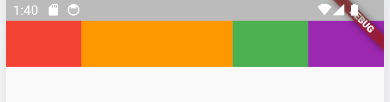
Expanded
부모의 남은 부분을 모두 채운다.
flex를 사용하여 비율을 조절 한다.
children: [
                Expanded(
                  flex: 1,
                  child: Container(
                    color: Colors.red,
                    width: 50.0,
                    height: 50.0,
                  ),
                ),
                Expanded(
                  flex: 2,
                  child: Container(
                    color: Colors.orange,
                    width: 50.0,
                    height: 50.0,
                  ),
                ),
                Expanded(
                  child: Container(
                    color: Colors.green,
                    width: 50.0,
                    height: 50.0,
                  ),
                ),
                Expanded(
                  child: Container(
                    color: Colors.purple,
                    width: 50.0,
                    height: 50.0,
                  ),
                )
              ],
Flexible
크기 변화 없이 크기만큼 부모의 공간을 버린다.
flex를 사용하여 비율을 조절 한다.
children: [
                Flexible(
                  flex: 1,
                  child: Container(
                    color: Colors.red,
                    width: 50.0,
                    height: 50.0,
                  ),
                ),
                Expanded(
                  child: Container(
                    color: Colors.orange,
                    width: 50.0,
                    height: 50.0,
                  ),
                ),
                Expanded(
                  child: Container(
                    color: Colors.green,
                    width: 50.0,
                    height: 50.0,
                  ),
                ),
                Expanded(
                  child: Container(
                    color: Colors.purple,
                    width: 50.0,
                    height: 50.0,
                  ),
                ),
              ],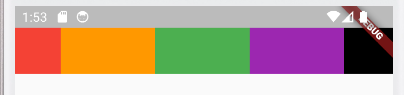
Flexible를 사용한 컨테이너는 크기 변화 없이 왼쪽에 크기만큼 부모의 공간은 비워 두었고 다른 컨테이너는 Expanded 로 인해 나머지 공간을 동일한 비율로 채운다.
실습
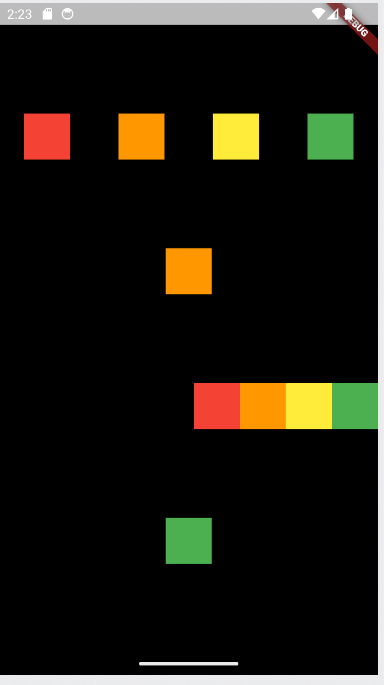
Column 과 Row 하위에 Column 과 Row를 사용하여 위와 같은 배치를 할 수 있다.
import 'package:flutter/material.dart';

class HomeScreen extends StatelessWidget {
  const HomeScreen({super.key});

  @override
  Widget build(BuildContext context) {
    return Scaffold(
      body: SafeArea(
        bottom: false,
        child: Container(
            color: Colors.black,
            width: MediaQuery.of(context).size.width,
            child: Column(
              mainAxisAlignment: MainAxisAlignment.spaceEvenly,
              children: [
                Row(
                  mainAxisAlignment: MainAxisAlignment.spaceAround,
                  children: [
                    Container(
                      color: Colors.red,
                      width: 50.0,
                      height: 50.0,
                    ),
                    Container(
                      color: Colors.orange,
                      width: 50.0,
                      height: 50.0,
                    ),
                    Container(
                      color: Colors.yellow,
                      width: 50.0,
                      height: 50.0,
                    ),
                    Container(
                      color: Colors.green,
                      width: 50.0,
                      height: 50.0,
                    )
                  ],
                ),
                Container(
                  color: Colors.orange,
                  width: 50.0,
                  height: 50.0,
                ),
                Row(
                  mainAxisAlignment: MainAxisAlignment.end,
                  children: [
                    Container(
                      color: Colors.red,
                      width: 50.0,
                      height: 50.0,
                    ),
                    Container(
                      color: Colors.orange,
                      width: 50.0,
                      height: 50.0,
                    ),
                    Container(
                      color: Colors.yellow,
                      width: 50.0,
                      height: 50.0,
                    ),
                    Container(
                      color: Colors.green,
                      width: 50.0,
                      height: 50.0,
                    )
                  ],
                ),
                Container(
                  color: Colors.green,
                  width: 50.0,
                  height: 50.0,
                ),
              ],
            )),
      ),
    );
  }
}
728x90
'Flutter(Dart 포함)' 카테고리의 다른 글
| 10-1. StatefulWidget (flutter) (0) | 2023.09.19 |
|---|---|
| 9. Web view (flutter) (0) | 2023.09.18 |
| 7. Splash Screen (flutter) (0) | 2023.09.14 |
| 6. Widget Tree 정의 (Flutter) (0) | 2023.09.14 |
| 5. Dart 3.0 업데이트 문법 (0) | 2023.09.12 |


