고정 헤더 영역
상세 컨텐츠
본문
728x90
display:flex
레이아웃 구성시 수평/수직 구조를 쉽게 만들어 줄 수 있는 display 속성
container안에 items를 수직으로 쌓는 구조
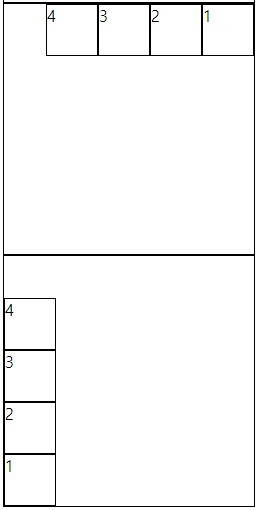
flex-direction: row (세로형,기본값,좌측부터 정렬)
flex-direction: column(가로형,위쪽부터 정렬)
flex-direction: row-reverse(세로형,우측부터 정렬)
flex-direction: column-reverse(가로형,아래쪽부터 정렬)
 <style>
        .row{
            flex-direction: row;
        }
        .column{
            flex-direction: column;
        }.row-reverse{
            flex-direction: row-reverse;
        }.column-reverse{
            flex-direction: column-reverse;
        }
</style>
<body>
    <div class="row"> <!--container-->
        <div>1</div> <!--items-->
        <div>2</div>
        <div>3</div>
        <div>4</div>
    </div>
    <div class="column">
        <div>1</div>
        <div>2</div>
        <div>3</div>
        <div>4</div>
    </div>
    <div class="row-reverse">
        <div>1</div>
        <div>2</div>
        <div>3</div>
        <div>4</div>
    </div>
    <div class="column-reverse">
        <div>1</div>
        <div>2</div>
        <div>3</div>
        <div>4</div>
    </div>
</body>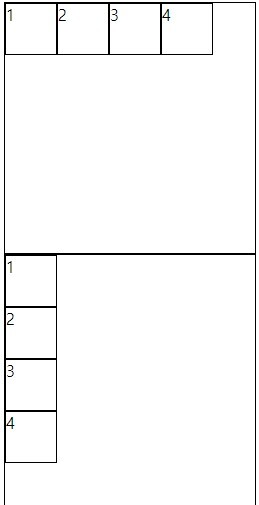
row , row-reverse
column,column-reverse
flex-wrap:nowrap
items의 가로값의 합이 container의 가로 값 보다 크게 설정되어도 무시하고 가로값에 균일하게 채워진다. (합이 작으면 여백이생김)
flex-wrap:wrap
items의 가로값의 합이 container의 가로 값 보다 크게 설정되면 줄을 바꾸어 items를 배열함
<style>
        .nowrap,.wrap{
            display:flex;
            width: 250px;
            height: 250px;
            border: 1px solid #000;
        }
        .nowrap div,.wrap div{
            width: 80px;
            height: 50px;
            border: 1px solid #000;
        }
        .nowrap{
            flex-direction: row;
            flex-wrap: nowrap;
        }
        .wrap{
            flex-direction: row;
            flex-wrap: wrap;
        }
</style>
    <div class="nowrap">
        <div>1</div>
        <div>2</div>
        <div>3</div>
        <div>4</div>
    </div>
    <div class="wrap">
        <div>1</div>
        <div>2</div>
        <div>3</div>
        <div>4</div>
    </div>
flex-flow를 사용하여 위두가지 속성을 한번에 작성 할 수 있다.
flex-flow : row nowrap , flex-flow:column wrap
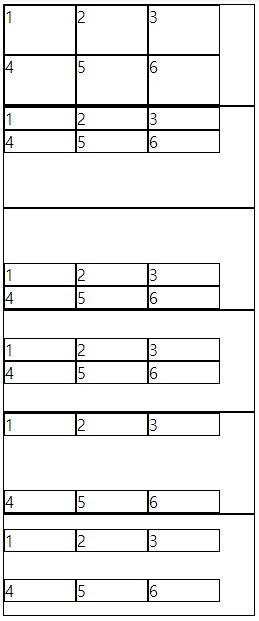
justify-content : flex-srart (기본값, 좌측부터 정렬)
justify-content : flex-end (우측부터 정렬)
justify-content : center (가운데 정렬)
justify-content : space-between (시작점부터 시작되며 items사이에 균일한 공간을주고 정렬)
justify-content : flex-srart(시작점 부터 items간에 균일한공간을 주고 정렬)
 .flex_start{
            justify-content: flex-start
        }
        .flex_end{
            justify-content: flex-end
        }
        .center{
            justify-content: center
        }
        .space-between{
            justify-content: space-between
        }
        .space-around{
            justify-content: space-around
        }
align-content 은 반드시 2줄 이상이고 여백이 있을 경우만 사용가능
align-content : stretch (기본값, container의 교차축을 채우기 위해 items를 늘림)
align-content :flex-start
align-content :fles-end
align-content:center
align-content :space-between
align-content :space-around
.stretch{
            align-content: stretch;
        }
        .flex_start{
            align-content: flex-start
        }
        .flex_end{
            align-content: flex-end
        }
        .center{
            align-content: center
        }
        .space-between{
            align-content: space-between
        }
        .space-around{
            align-content: space-around
        }
728x90
'Front-end > HTML' 카테고리의 다른 글
| 반응형웹(기본구조), 가변형 레이아웃 (0) | 2023.06.16 |
|---|---|
| HTML-web2-심화 학습- background (0) | 2023.06.10 |
| HTML web2 19일차 - animation (0) | 2023.06.07 |
| HTML web2 18일차 - table태그 (0) | 2023.06.07 |
| HTML web2 17일차 - 스프라이트이미지 (0) | 2023.06.06 |


